1. Image Merging:
Write code to merge two images of the computer scientist Grace Hopper. In 1952, Grace Hopper and her team created the first compiler for computer languages.
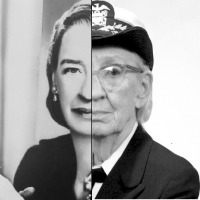
The inputs to your function are: (i) image left: grace_1.png (size: 350 Rows X 340 Cols), (ii) image right: grace_2.png (size: 350 Rows X 340 Cols), (iii) image column (c) at which the images should be merged.
2. Intensity Scaling:
Write code to scale the intensity of the left section of the merged image by a scaling factor of alpha and the right section by a scaling factor of beta.
Image Scaling: Image/Intensity scaling is a linear image operation where each pixel is multiplied by a scaling factor. The scaling factor is a value between 0 and 1.
The inputs to your function are: (i) input image, (ii) image column at which left section ends, (iii) alpha: scaling factor for the left section (0 <= alpha <= 1) and (iv) beta: scaling factor for the right section ((0 <= beta <= 1).
3. Centralizing pixel intensities:
Write code to centralize the intensities of the two sections of the image.
Centralizing Pixels: When merging, the two images can have very different overall brightness values. Here the goal is to make sure that the average intensities of the left section and the right section are equal and centralized (= 128). After centralizing pixels, the average of all the pixels in the left section will be ~128 and the average of all the pixels in the right section will be ~128 as well.
Let M be the input image. Let l be all the intensities in the left section of the image and r all the intensities in the right section of the image.
Steps:
Note: After applying the operation, some pixels may end up being < 0 or > 255. Clip these pixels, such that any value greater than 255 is assigned a value of 255, and any value less than 0 will be assigned a value of 0.
The inputs to your function are: (i) image, (ii) image column at which left section ends.
Note:
Do not use any in-built functions from opencv and numpy (E.g: np.mean). In general, you can use function from math library.
Only Functions allowed for this part are: np.array(), np.matrix(), np.zeros(), np.ones(), cv2.imread(), cv2.namedWindow(), cv2.waitKey().
- python dip_hw0.py -ir <image-name> -il <image2-name> -c <c> -a <alpha> -b <beta> - Example: python dip_hw0.py -il grace_1.png -ir grace_2.png -c 155 -a 0.2 -b 0.8 Two images are provided for testing: grace_1.jpg and grace_2.png
PS. Please do not change dip_hw0.py, requirements.txt, and Jenkinsfile.
Delivering a high-quality product at a reasonable price is not enough anymore.
That’s why we have developed 5 beneficial guarantees that will make your experience with our service enjoyable, easy, and safe.
You have to be 100% sure of the quality of your product to give a money-back guarantee. This describes us perfectly. Make sure that this guarantee is totally transparent.
Read moreEach paper is composed from scratch, according to your instructions. It is then checked by our plagiarism-detection software. There is no gap where plagiarism could squeeze in.
Read moreThanks to our free revisions, there is no way for you to be unsatisfied. We will work on your paper until you are completely happy with the result.
Read moreYour email is safe, as we store it according to international data protection rules. Your bank details are secure, as we use only reliable payment systems.
Read moreBy sending us your money, you buy the service we provide. Check out our terms and conditions if you prefer business talks to be laid out in official language.
Read more

Recent Comments